Environment Variables
Dockman can be customized through environment variables to suit your preferences.
When you launch a Dockman instance, a detailed information table will automatically appear in the logs. This table provides:
| Config Names | Current Values | Descriptions | Environment Variable |
|---|
To see all available configuration options for your specific version, refer to this table in the logs.
Example Logs
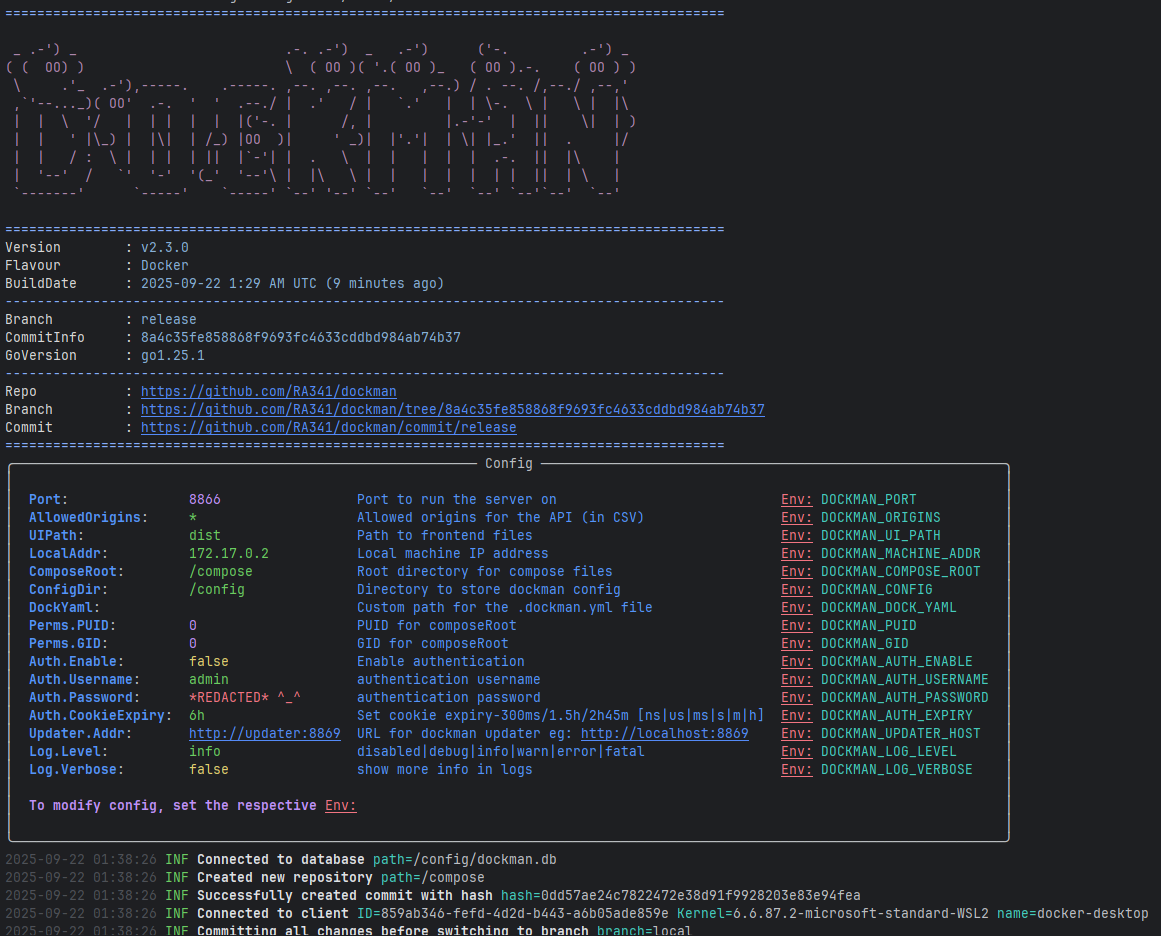
Setting Environment Variables
You can set environment variables directly in your compose file or import them via a .env file:
Environment:
docker-compose.yaml
dockman:
  image: ghcr.io/ra341/dockman:latest
  environment:
    - DOCKMAN_COMPOSE_ROOT=/home/docker/stacks
    - DOCKMAN_AUTH_ENABLE=true
Environment File:
dockman.env
DOCKMAN_COMPOSE_ROOT=/home/docker/stacks
DOCKMAN_AUTH_ENABLE=true
DOCKMAN_AUTH_USERNAME=test
DOCKMAN_AUTH_PASSWORD=wow
docker-compose.yaml
dockman:
  image: ghcr.io/ra341/dockman:latest
  env_file:
    - ./dockman.env